04 — The result
From ingredients to recipes in two screens.
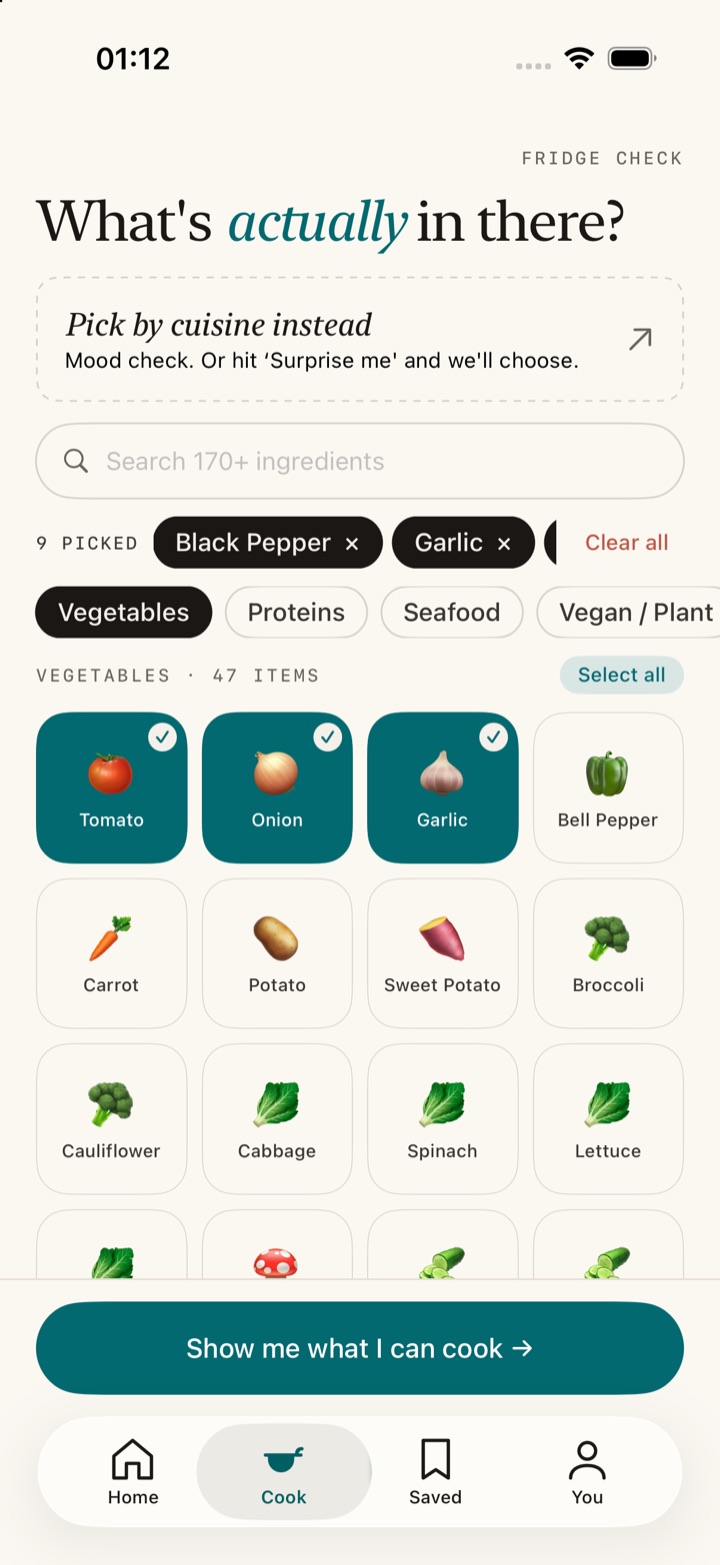
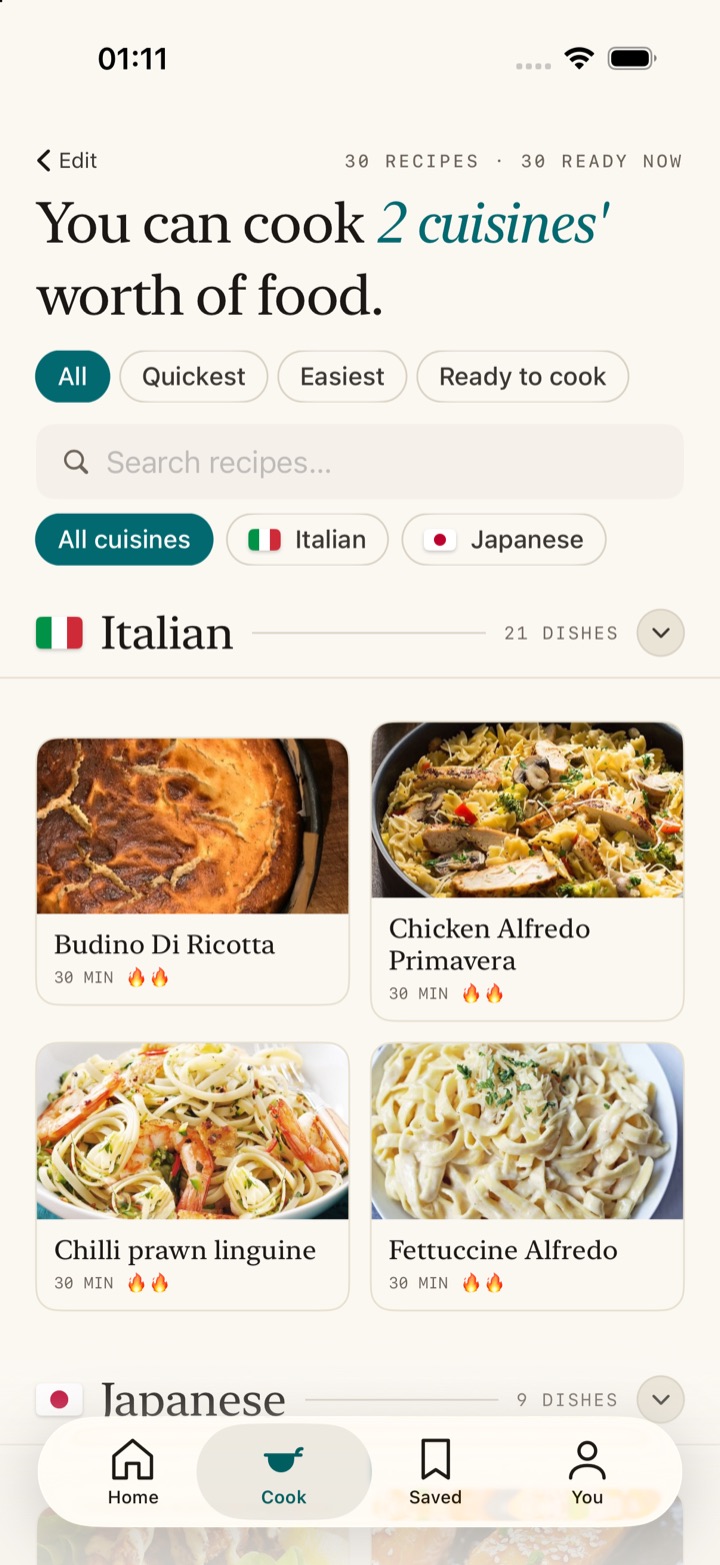
Select the ingredients you have to see what you can cook tonight.
17,369Recipes
20Cuisines
178Ingredients
2Native apps
0Accounts
0Trackers
SoloCook starts with what's in your fridge and finds recipes you can cook tonight, scaled for one person. It runs entirely on your phone. Here's how I designed and built it.
Cooking for one often starts with halving or quartering a recipe. Cook the whole thing and there are another three portions to get through, even if you no longer fancy it. Recipe apps often assume there are four of you.
I saw a lot of friction before any cooking could begin: deciding what to make, checking the ingredients, scaling the recipe and planning for leftovers. Each step is manageable, but together they can make ordering a takeaway feel easier, even when you want to cook and know how.
Delivery apps make ordering easy: they remember your address and suggest food you want. That convenience can cost more than £200 a month, compared with about £30 for a week of cooking for yourself. I wanted to make cooking easier to start. Instead of asking "what should I cook?", I asked "what can I cook, right now, with what's already in the fridge?"
Recipes serve four and often need a shopping trip before you can start.
Cooking once on Sunday means eating the same meal five times during the week.
A saved recipe is hard to use tonight if you don't have the ingredients.
I worked out the approach quickly once I focused on the effort involved in getting dinner ready. These were the decisions I made.
I started with what someone already owns, then used those ingredients to find recipes they could cook that evening.
I made a grid of ingredients and saved each selection, so people wouldn't have to type their pantry list again every time they opened the app.
I found that appliances mattered as much as ingredients. Someone with a hob and kettle needs different recipes from someone with an air fryer and oven.
I kept recipes that were one ingredient short in the results and flagged the missing item, so people could see what to pick up on the way home.
A well-stocked kitchen was straightforward to design for. I spent most of my design effort on what the app says when there's barely anything in.
All the ingredients are there. You can cook without a shopping trip.
The app names the single ingredient you need.
There is enough to cook. Adding a staple or two would give you more options.
The app explains the gap and suggests two items that would let you cook.
I designed SoloCook and built two native apps by describing what I wanted in conversation. I read every diff, ran the changes on a real device and used what I found to guide the next change.
Getting a working screen in minutes changed how I designed. I was designing in the running app, where I caught awkward states as I tried it: the home screen before a first meal, results with only four ingredients selected, or an image that failed to load.
AI-generated code can compile and look right while still behaving incorrectly. I had to be deliberate about deciding what to check. I gave the ingredient matcher a test harness before building its interface; the first run caught two real bugs. I also tested a navigation change on an emulator to check how it behaved.
I store your pantry, bookmarks, streak and saved-money total in the operating system's own key-value store. There is no account, sign-in or sync. Deleting the app deletes that data too.
I use a single Cloudflare Worker to find a photo from a recipe name. It tries Wikipedia first, then a stock search, and caches the result for a month. Each dish costs one lookup, ever.
Select the ingredients you have to see what you can cook tonight.
Built and working
Not claimed
The app is working, but these limits still matter when assessing the design.
Free. No account. Nothing leaves your phone.